1. Open Outlook 2019.

2. In the left panel. You can see a list of your email accounts, double-click on it to expand.
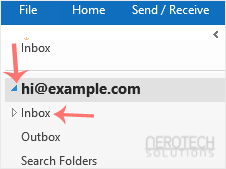
3. Click on Inbox, and it will start syncing.

1. Open Outlook 2019.
2. In the left panel. You can see a list of your email accounts, double-click on it to expand.
3. Click on Inbox, and it will start syncing.